Backups to your own storage
Amazon S3, Cloudflare R2, Wasabi, DigitalOcean Spaces, MinIO or any S3-compatible service. A full backup weekly and only the changed files in between.
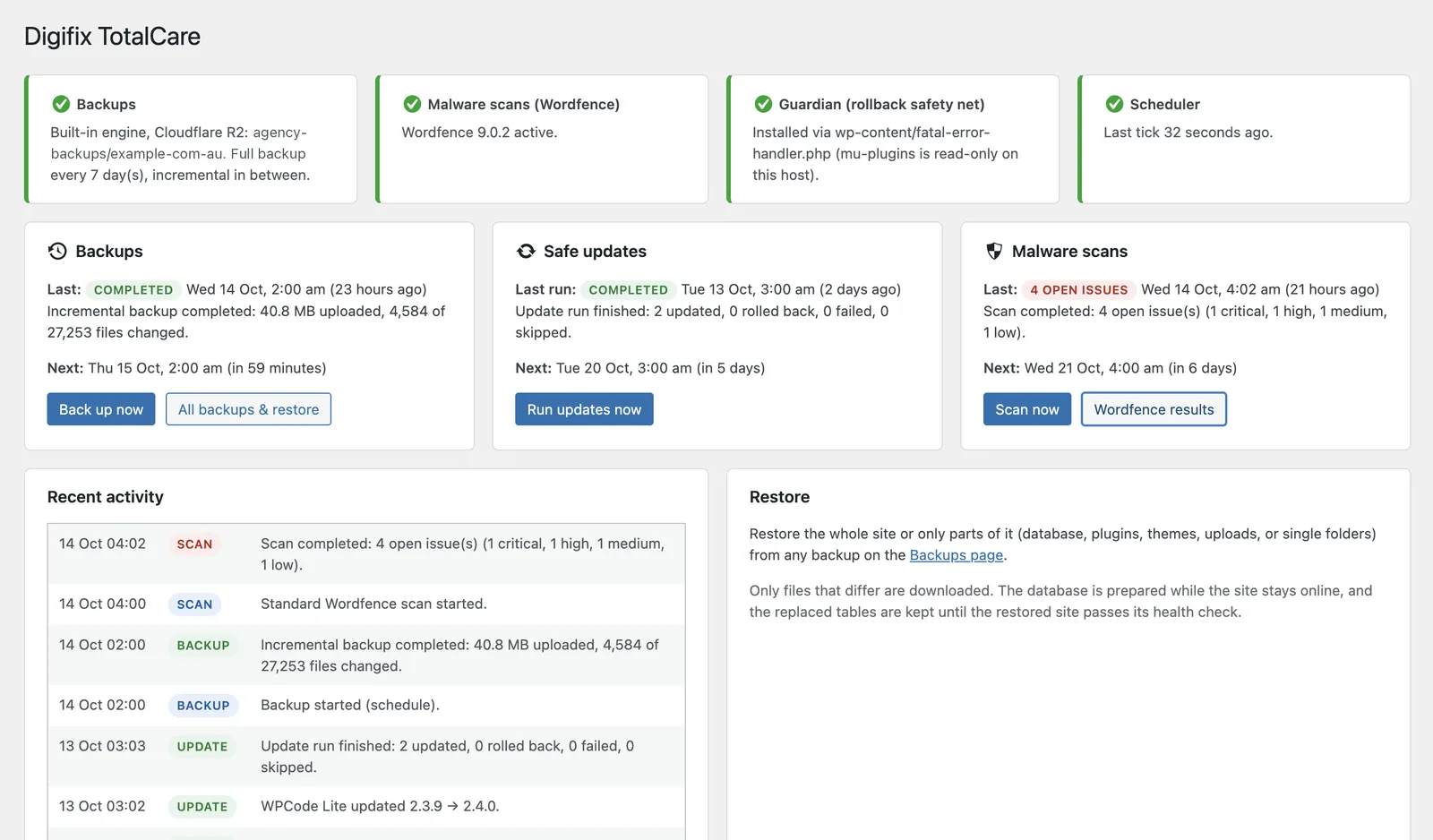
TotalCare backs your site up to your own cloud storage, updates plugins one at a time and undoes any update that breaks the site, runs scheduled malware scans, and reports on all of it to you and your clients.
By the time anyone's awake, it's already fixed.
Update run startsA backup is taken first, then plugins are updated one at a time.
An update breaks the siteEvery page shows "There has been a critical error on this website".
Rolled back on its ownThe previous version goes back in, the site passes its health check, and that version is skipped from now on.
An email is waitingIt explains what was updated, what was rolled back, and what happened.
Install it once, connect your storage, and TotalCare looks after the routine work. Everything it does is logged and reported.
Amazon S3, Cloudflare R2, Wasabi, DigitalOcean Spaces, MinIO or any S3-compatible service. A full backup weekly and only the changed files in between.
Plugins, themes and WordPress core, one item at a time, with a health check after each. Anything that breaks the site is rolled back automatically.
Runs Wordfence scans on TotalCare's own schedule and alerts you straight away when serious issues are found.
A dashboard and activity log in wp-admin, email alerts and summaries, a monthly client report as a PDF, and a signed webhook for your tools.
.tar.gz and .sql.gz files you can open with any tool.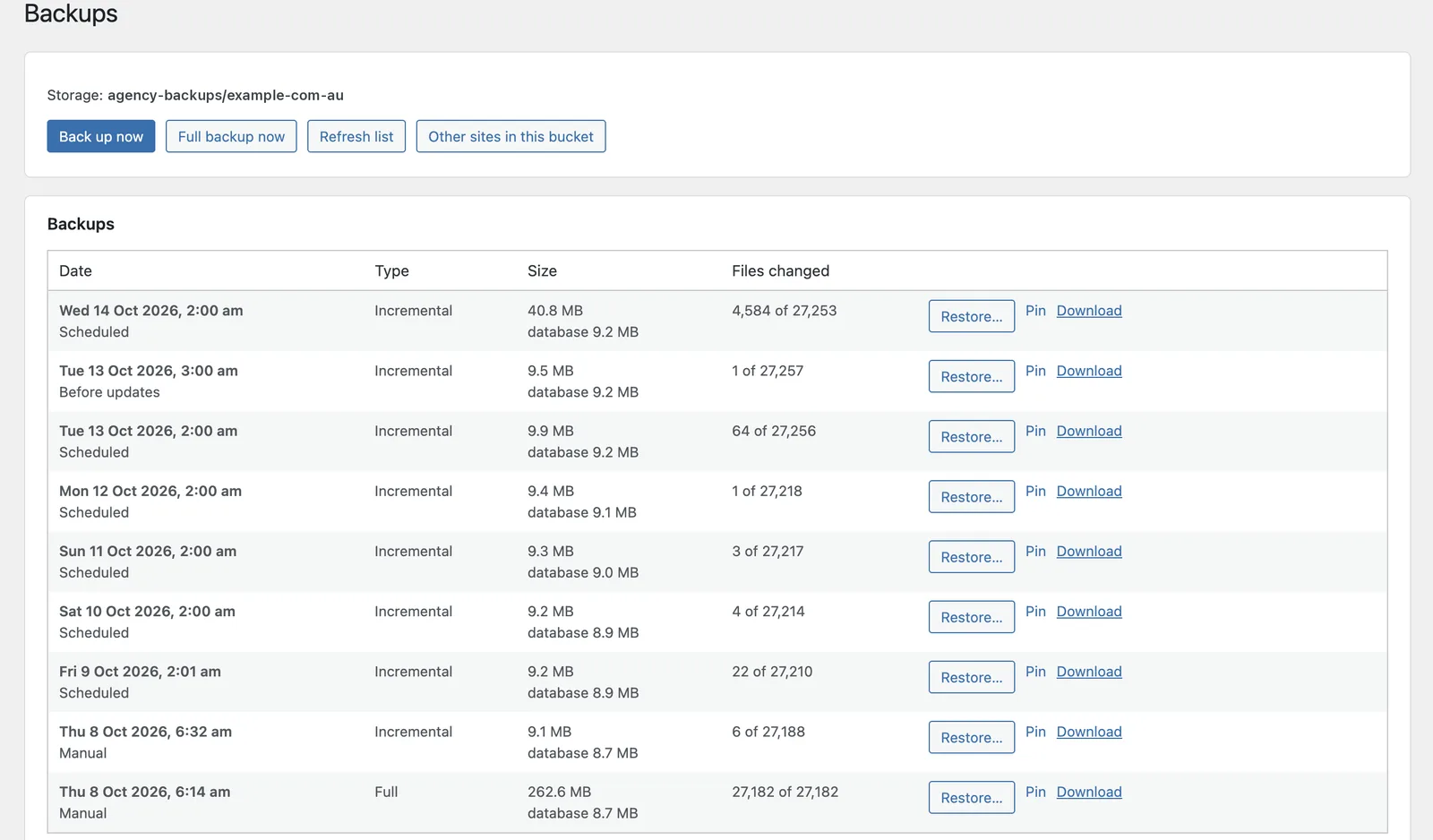
One full backup, then about 9 MB a day for a site with 27,000 files.
Updates run on a schedule you choose. TotalCare checks the site after every single item, so one bad release never takes the rest down with it.
A backup is taken before anything changes.
Each plugin, theme or core update is installed on its own.
The site is checked after every item.
The previous copy goes back in, and that version is skipped until a newer one is released.
You get an email. If the site is still broken, it's restored from the pre-run backup first.
The guardian. A small must-use plugin that loads before everything else. If a PHP fatal error stops every request, it swaps the previous version back on the very next request, so TotalCare can repair a site that can't even load its admin.
Each site gets its own folder. Every folder knows which site owns it, so a staging copy can never overwrite or prune the live site's backups.
Install TotalCare on the new site, point it at the same bucket, and restore from Other sites in this bucket. URLs, paths and table prefix are adjusted for you.
Failure alerts and summaries go to you and, if you choose, to your client. A monthly report is ready as a PDF or a printable page.
A signed JSON webhook for Slack, n8n and similar, plus WP-CLI commands for scripting.
$ wp totalcare backup
$ wp totalcare list
$ wp totalcare restore
$ wp totalcare verify
$ wp totalcare prune
# wp help totalcare for all options
TotalCare doesn't run a storage service of its own and sends nothing to Digifix.
Backups go only to the bucket you configure, over HTTPS. No local copies are kept, and the secret key is stored encrypted.
No telemetry and no analytics. The only outside connections are your storage, an optional webhook you set, and your own site.
wp-content.htaccess rule for LiteSpeedDeleting the plugin removes all of it. Your backups in storage are never touched.
wp-cron.php every minute from your host, then use "Test background requests" in Settings to confirm your host lets work finish.mysqliWorks on shared hosts including Hostinger and LiteSpeed servers.
Only for malware scans. Backups, restores, safe updates and reports all work without it.
Only in the bucket you configure: Amazon S3, Cloudflare R2 or another S3-compatible service. TotalCare doesn't run a storage service of its own and keeps no local copies of backups.
The update is rolled back straight away from a copy of the plugin or theme taken just before. If a PHP fatal error stops every request, the guardian swaps the copy back on the next request. If the site is still broken after the run, TotalCare restores the database and code from the backup taken before the run, and emails you.
Yes. Install WordPress and TotalCare on the new site, enter the same bucket details, then go to Backups → Other sites in this bucket and restore the old site's latest backup. URLs, paths and the table prefix are adjusted for you. Afterwards you log in with the old site's users.
No. Each backup folder records which site owns it, and a site with a different address refuses to write to or prune that folder. After a real domain change, use Backups → Take over this folder.
Yes. TotalCare was built for shared hosting and adds the LiteSpeed rule that background requests need. Use the "Test background requests" button in Settings to check your host.
They stay where they are and can still be restored with WPvivid. TotalCare's first backup is a full one.
No, only single-site installs.
TotalCare is free and open source. Download the latest release from GitHub; the WordPress.org listing is on its way.